What Self-Hosted Actually Is
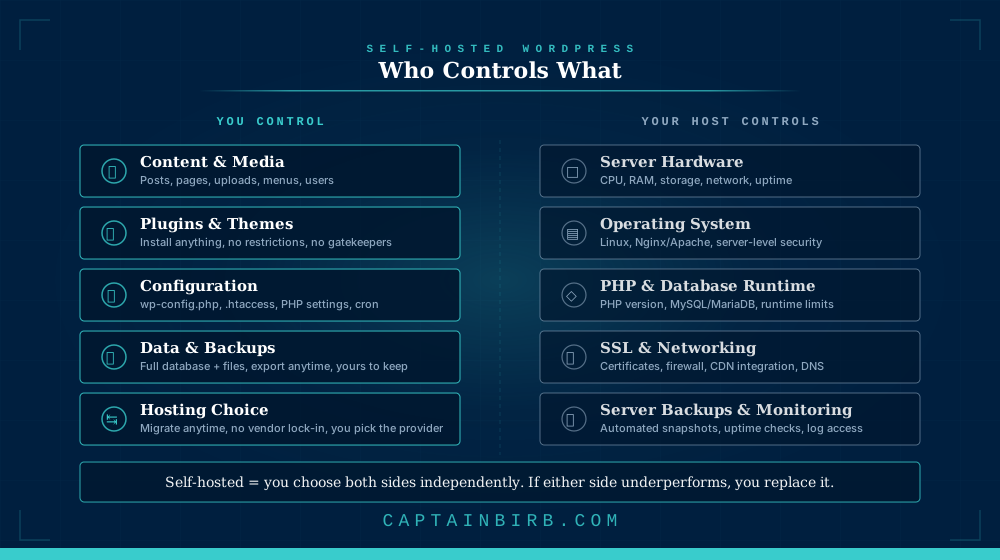
Self-hosted WordPress means you download the WordPress software from WordPress.org, install it on a server you have contracted with a hosting provider, and manage the site yourself or through a service you choose. The hosting provider gives you the server. WordPress.org gives you the software. Everything else is your decision.
“Self-hosted” does not mean you run a physical server in your office. It means you choose your hosting provider independently of the software. You might use a managed WordPress host like Kinsta, a cloud VPS from DigitalOcean, or a traditional shared hosting account. The common thread is that the WordPress software, the database, and the files all live on infrastructure you selected, and you can move them to a different provider at any time.
This is the standard way to run WordPress. When developers, agencies, and the WordPress community say “WordPress” without qualification, they mean this.
Why It Matters for Your WordPress Site
Self-hosting gives you three things that no hosted platform can fully replicate.
Unrestricted extensibility. You can install any plugin, upload any theme, write custom PHP, modify core behaviour with hooks, and integrate with any external service. No gatekeeper decides what you are allowed to add to your own site.
Data ownership. Your database, your uploads, your configuration files: all of it lives on infrastructure you control. You can download a complete backup at any time. You can hand the entire site to a different developer or agency without asking permission from a platform vendor.
Hosting independence. If your host raises prices, degrades service, or changes terms, you migrate. The process takes hours, not months. Your WordPress installation is portable by design; the software does not care which server it runs on.
| Capability | Self-hosted WordPress | WordPress.com (Free/Personal) | Squarespace / Wix |
|---|---|---|---|
| Install any plugin | Yes | No | No |
| Upload custom themes | Yes | No (Business+ only) | Limited |
| Full code access (PHP, DB) | Yes | No (Business+ only) | No |
| Choose your own host | Yes | No | No |
| Export everything (files + DB) | Yes | Partial | Partial |
| Modify core behaviour | Yes | No | No |
| Server-level configuration | Yes (depending on host) | No | No |
What Most People Get Wrong
The biggest misconception is that self-hosted WordPress requires technical expertise. It does not, if you choose the right host. A managed WordPress host handles server maintenance, security patching, backups, and PHP updates. You manage WordPress itself: content, plugins, theme. The “self” in self-hosted refers to the independence of the arrangement, not a requirement to administer Linux servers.
The second misconception is that self-hosted is more expensive. WordPress.com’s Business plan (the minimum tier that allows plugin installation) costs $33/month. A quality managed WordPress host starts at $25-35/month and gives you more control, better performance tooling, and no platform restrictions. The cost comparison favours self-hosting for any site that needs the features WordPress.com locks behind its higher tiers.
The third: that self-hosting means you are on your own. The WordPress community is one of the largest open-source communities in existence. Documentation, forums, developer resources, and thousands of agencies and freelancers exist specifically to support self-hosted WordPress sites. You are independent, not isolated.
The CaptainBirb Take
Self-hosted WordPress is the correct default for any site that represents a business, generates revenue, or needs to grow without permission. The flexibility, portability, and ownership it provides are not premium features; they are the baseline. WordPress was built to be self-hosted. Every other arrangement is a trade-off against that baseline.
What to do about it: if you are starting a new WordPress site, choose a managed WordPress host, install WordPress, and you are self-hosted. If you are currently on WordPress.com and hitting restrictions, evaluate a migration to self-hosted before upgrading to a higher WordPress.com tier. The migration is a one-time effort; the independence is permanent.