

- › WordPress.org distributes free, open-source software you install on your own hosting. WordPress.com is a commercial hosting service that runs that software for you, on Automattic's infrastructure and terms.
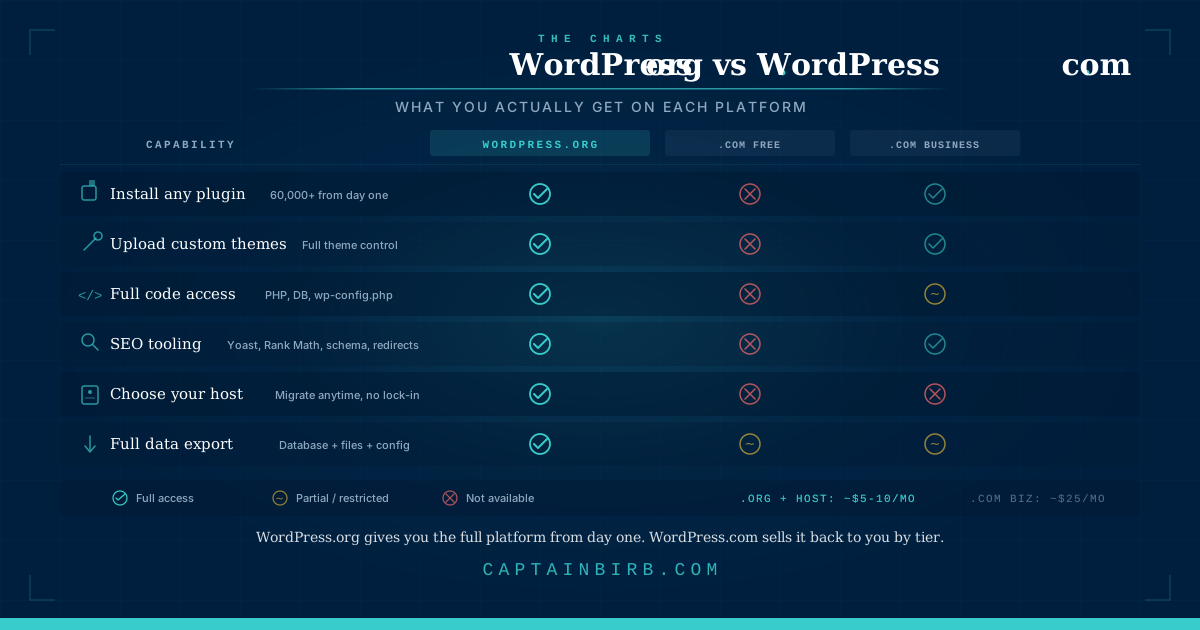
- › On WordPress.com, your site's capabilities are governed by your subscription tier. The plugin ecosystem, the core strength of WordPress, is locked behind the Business plan at approximately $25/month.
- › Self-hosted WordPress with reputable managed hosting costs roughly the same as WordPress.com Business, and gives you the full platform without platform-level restrictions.
- › The SEO ceiling on WordPress.com's lower tiers is real: no third-party SEO plugins, limited schema control, no direct technical file access.
- › If your site serves any commercial or professional purpose, WordPress.org on managed hosting is the correct foundation. The WordPress.com free plan is not free in any meaningful sense.
The confusion between WordPress.org and WordPress.com is not an accident: Automattic built a commercial hosting service on top of the open-source WordPress software and named it almost identically. Twenty years later, people still choose the wrong platform, not from carelessness, but because the naming makes it genuinely difficult to distinguish between a piece of software and a subscription service.
TL;DR
| WordPress.org | WordPress.com | |
|---|---|---|
| What it is | Free, open-source software | Commercial hosting service |
| Who controls the server | You (via your host) | Automattic |
| Plugin access | Full 60,000+ plugins from day one | Locked behind Business plan (~$25/mo) |
| Entry cost | Hosting from ~$5–10/mo | Free tier to ~$25/mo (Business plan) |
| Site ownership | Complete files, database, config | Partial you own content, not infrastructure |
| Portability | Full move hosts anytime | Constrained by plan and export limitations |
| SEO tooling | Unrestricted (Rank Math, Yoast, etc.) | Restricted on Personal plan and below |
| Best suited for | Any site with professional or commercial intent | Personal projects with no growth expectations |
The Name Problem
WordPress is open-source software. It is built and maintained by a global community of contributors, governed by the WordPress Foundation, and distributed free of charge at WordPress.org. No one owns it in the commercial sense. Anyone can run it on any server they choose.
WordPress.com is a company, technically Automattic, that built a hosting service on top of that software and chose to name it almost identically. The “.com” suffix is not “the commercial version of WordPress.” It is a separate product that happens to run WordPress underneath it, on Automattic’s infrastructure, under Automattic’s terms.
This naming decision benefited Automattic. When people search “WordPress,” they find both properties side by side. The confusion converts searchers into paying subscribers for a service they may not have chosen if the distinction had been clearer. That is not a conspiracy: it is product strategy. But understanding it helps you make the right decision for yourself.
What Each One Actually Is
WordPress.org is a download. You visit the site, download the software, install it on a server you rent from a hosting provider, and you own everything that results: the database, the files, the configuration, the plugin stack, the domain association, and every decision about what runs on your site. The software is free. The hosting is not, but the hosting is your choice.
WordPress.com is a subscription service. You create an account, pick a plan, and Automattic runs WordPress for you on their infrastructure. You do not own the server. You have no file system access. The platform’s features, including the ability to install plugins, are gated by which plan you pay for. You own your content, but you are operating within Automattic’s rules, on Automattic’s timeline.
The practical difference: WordPress.org gives you the software, WordPress.com sells you a subscription to a service that uses the software. These are not two tiers of the same product. They are different business models with different ceilings.
The Renter vs. Owner analogy: WordPress.com is renting a managed apartment. Automattic handles the building maintenance: security updates, server upkeep, infrastructure reliability – but you cannot knock down walls (no direct file or code access on lower tiers) and you pay a monthly fee for that convenience. WordPress.org is owning the house and the land outright. You can remodel anything. But when the roof leaks – site goes down, plugin conflict, security incident – the repair is yours to manage or delegate.
What You Control
On WordPress.com
What you can do on WordPress.com is governed by which plan you subscribe to.
On the free plan: no custom domain, WordPress.com branding on your site, and advertisements that may appear on your content: ads that earn revenue for Automattic, not for you. On the Personal plan, you get a custom domain and remove ads, but plugin installation remains blocked. On the Business plan, you unlock plugin installation, theme uploads, and access to the broader WordPress ecosystem.
The Business plan costs approximately $25/month billed annually. At that price point, you can finally use WordPress as it was designed to work. But you are still operating on Automattic's infrastructure, within their terms of service, and subject to their platform decisions. The nuance worth noting: the plugin access that unlocks at $25/month on WordPress.com is available from day one on a self-hosted site with hosting that costs $5–10/month.
On WordPress.org (Self-Hosted)
Self-Hosted WordPress puts every decision in your hands. Plugins, themes, custom code, server-level configuration, database access, wp-config.php: all of it. There is no subscription tier that gates functionality. The full WordPress ecosystem of 60,000+ plugins and thousands of commercial themes is available from day one.
The constraint on self-hosted WordPress is not permission. It is capability: what you have the knowledge and the hosting environment to do. That is a meaningful difference. Capability gated by skill and setup is something you can grow into, learn, or hire around. Capability gated by a subscription tier is a ceiling that someone else controls.
The Real Cost Comparison
The framing of “WordPress.com is cheaper” does not survive honest accounting.
WordPress.com Business plan: approximately $25/month billed annually. This is the tier where plugin installation is first unlocked: the point where .com becomes functionally comparable to self-hosted WordPress. Below this tier, you are working with a platform that cannot install a contact form plugin without an upgrade.
WordPress.org on managed hosting: $25–50/month at the entry to mid level. This typically includes a domain, genuine per-site resource isolation (not shared infrastructure), daily backups, a staging environment, and the full WordPress platform with no feature restrictions.
The cost difference at the tier where both platforms are genuinely useful is small. The capability difference is not.
The Hidden Cost of Free and Personal Tiers
The free plan on WordPress.com is not free in any meaningful sense for a professional site. Automattic runs ads on your site and retains the revenue. Your visitors see advertisements you did not choose, from advertisers you did not approve. The platform is free to you because your content and your audience are the product.
The Exit Strategy
If you start on WordPress.com and later need to move to self-hosted WordPress, you can export your content, but not your configuration, theme customizations built through their block editor, or your URL structure without manual work. WordPress.com’s export tool gives you an XML file of your posts and pages. It does not give you a portable site. Your design, widget placements, and custom CSS live in Automattic’s system, not in a transferable format.
The practical consequence: migrations from WordPress.com to self-hosted WordPress work, but they require effort, and they occasionally surface broken redirects, missing media, or formatting inconsistencies that need fixing. The cost is not catastrophic, but it is real. Starting on the correct platform from the beginning costs nothing extra. Migrating six months or two years later costs time, or money, or both.
The SEO Ceiling
Google’s ranking factors in 2026 reward technical precision: Core Web Vitals performance scores, structured data markup, crawl efficiency, and granular metadata control. The tooling that delivers this level of precision on WordPress is Rank Math, Yoast SEO, and direct access to your site’s technical configuration.
On WordPress.com’s lower tiers, none of that tooling is available. Schema markup, canonical tag management, sitemap customization, and redirect handling are limited to what Automattic’s built-in SEO tools provide. Those tools are adequate for basic publishing. They are not the full professional toolset.
On self-hosted WordPress, you have complete technical SEO control from the start. Every meta tag, every schema type, every crawl directive: all configurable through plugins, and where needed, through direct code access.
The gap matters most for sites where search visibility drives revenue or audience growth. If your site is a personal journal with no professional purpose, the SEO ceiling on WordPress.com may be irrelevant to you. If your site is a business, the ceiling is a constraint you will eventually hit, at which point the choice becomes: upgrade to a plan that approximates self-hosted anyway, or migrate.
Making the Decision
Choose WordPress.com if:
- The site is a personal project with no commercial intent and no expectation of growth.
- You have zero interest in technical site management and are comfortable staying within the platform’s feature constraints indefinitely.
- You are on the Business plan or higher and have consciously evaluated the cost-to-capability ratio against managed WordPress hosting and chosen .com with full information.
Choose WordPress.org on managed hosting if:
- The site serves any commercial, professional, or organizational purpose.
- You intend to monetize in any form: advertising, e-commerce, subscriptions, lead generation, or paid membership.
- You want full plugin access, SEO tooling, and technical configuration control.
- You want to own the site’s environment completely, with no dependency on a platform provider’s terms or pricing decisions.
- You want your site to be portable: yours to move, yours to back up, yours to hand off without restrictions.
One clarification worth making explicit: choosing self-hosted WordPress does not mean managing a server yourself. Managed WordPress hosts (Kinsta, Pressable, WP Engine, WP.cloud) handle the infrastructure, the security patching, and the performance configuration. You get the full platform without the operational burden. The WordPress.org vs WordPress.com decision is about ownership and ceiling, not about whether you know what SSH is.
FAQ: People Also Ask
Are WordPress.com and WordPress.org the same company?
No. WordPress.org is open-source software maintained by a global community of contributors, governed by the non-profit WordPress Foundation. WordPress.com is a for-profit company (by Automattic) that uses that software to sell hosting packages. They share a founder in Matt Mullenweg, but they operate as distinct entities with different structures and different incentives.
Can I use WordPress.org without hosting?
No. WordPress.org is the software, not the service. Think of it as an engine: you cannot run an engine without somewhere to put it. You must purchase a hosting plan from a provider, install WordPress on that server, and connect your domain before your site is live on the internet. The software is free. The infrastructure it runs on is not.
Does WordPress.org require coding?
Not in 2026. While you can edit code on a self-hosted WordPress installation, the Block Editor (Gutenberg) and Site Editor introduced in recent WordPress versions allow you to build complete professional sites using drag-and-drop block interfaces. Custom code becomes relevant only if you are building proprietary features that no existing plugin handles.
Why do big organisations use WordPress?
Organisations including NASA have migrated to WordPress – in NASA’s case, consolidating over 1,000 websites onto a single platform – primarily because of WordPress Multisite. Multisite allows a single WordPress installation to manage hundreds or thousands of sub-sites from one dashboard, with centralised user management, consistent design systems, and enterprise-grade security controls. The scale and extensibility of the open-source ecosystem is the other factor: no licensing costs, no vendor lock-in, and a contributor base that numbers in the tens of thousands. Read the NASA migration case study.
Is WordPress.org hosting free?
The software is free. The hosting is not. But self-hosted WordPress is typically less expensive than the WordPress.com tier required to unlock the full platform. Reputable managed WordPress hosting starts at $5–10/month. The WordPress.com Business plan, the first tier where plugin installation is permitted, costs approximately $25/month.
Is WordPress.com worth it?
For a personal site with no commercial intent, the lower plans remove ads and add a custom domain. That is a reasonable trade if you genuinely want zero technical responsibility. For any site with professional or commercial intent, the Business plan ($25/month) delivers equivalent plugin access to self-hosted WordPress — at a higher price, with less control and less portability. At that point, managed WordPress hosting delivers more for the same or lower cost.
For most sites with any professional intent, the answer is the self-hosted WordPress.org on a reputable managed hosting. The hosting decision that follows – which provider, at which tier – is where the real nuance starts.
Transmit Response